Why use this feature?
When you create a new project and add profiles to it (for example, from your talent pool or LinkedIn), these profiles may have already been contacted in other projects. To avoid wasting time with profiles that have already been ruled out, you can choose to ignore them within this specific project.
Steps to follow
- Create your new project and add profiles from your talent pool or LinkedIn.
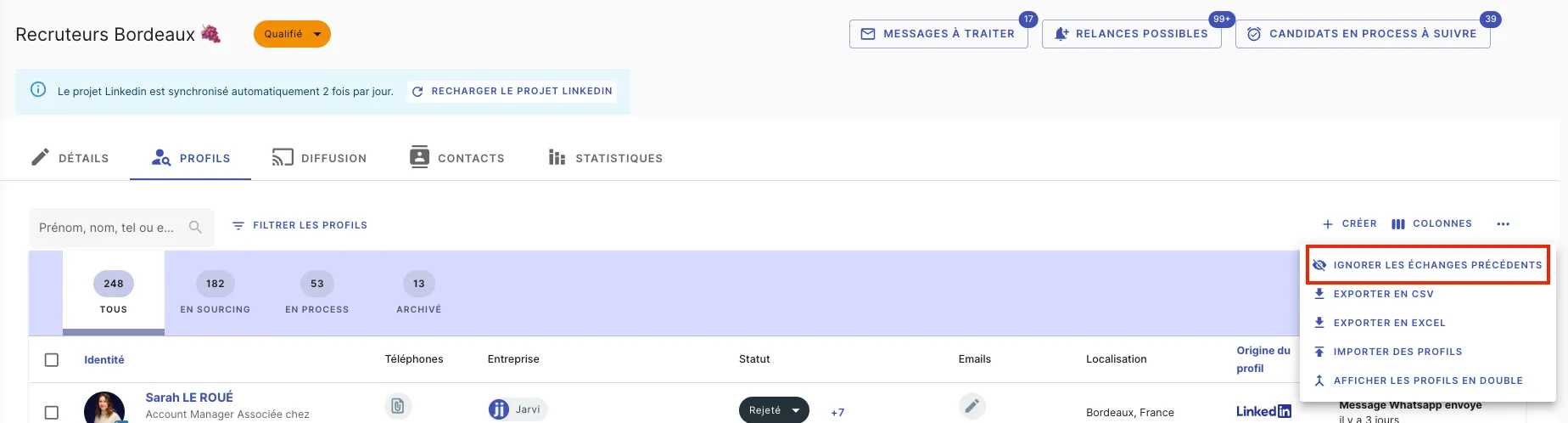
- Click on the three dots ”…” on the right side of the screen to display additional options.
- Select “Ignore previous exchanges”.
What happens next?
This action will reset all profiles in your project to not contacted, which means their conversation status will be reset only for this project. They will keep their status in other projects where they are included, but within this project, their progress will now be linked only to this one.
This allows you to track profile progress without interfering with their status in other projects.
And there you go! You can now manage your new projects without previous conversations affecting your profiles’ progress.