📘 This feature is not natively allowed by LinkedIn Sales Navigator.
Using tools like Evaboot or Jarvi is essential to export lists from LinkedIn Sales Navigator to Excel.
Once Jarvi and its extension are installed, you can click on the Jarvi extension from a Sales Navigator list to import it into Jarvi and export it to Excel or CSV format.
You too can save time with Jarvi
Request your access to export your Sales Navigator lists

Step by step: how to export a list of candidates or prospects from LinkedIn Sales Navigator to Excel or CSV?
1. Have a Jarvi account
If you don’t have a Jarvi account yet, you can request one here. You’ll then need to install the Jarvi Chrome extension as shown here.
Import Sales Navigator profiles into Jarvi
Once Jarvi and its extension are installed, go to a Sales Navigator list. By clicking on the Jarvi extension icon, an “Export” button will be visible.

Click on the Import button to start the loading process. It will be confirmed by this screen:

A few seconds later, you’ll find all the imported profiles in the Jarvi interface:

Jarvi has obtained a ton of information about the candidates or prospects: more details here
You can then use Jarvi to contact these profiles, take notes, structure your talent pool,… Or export all this data to Excel or CSV format, as shown below.
Export Jarvi profiles to Excel format
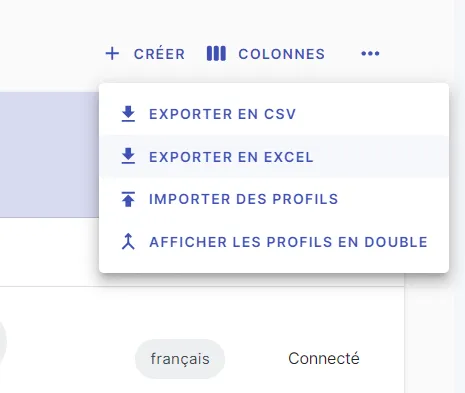
From the list of exported profiles, you can click on the … button then on “Export to Excel” or “Export to CSV” according to your preference.
The file will then download, containing all the information that Jarvi exports (and there’s a lot of it)!

This export can allow you to send a report to a client, a colleague, or use another tool like Hubspot, Waalaxy, …
Use the API directly
console.log('Code')